
Advanced Configuration
The AI Peon plugin provides advanced configuration options accessible via Window > Preferences > AI Peon > Peon Advanced Configuration.
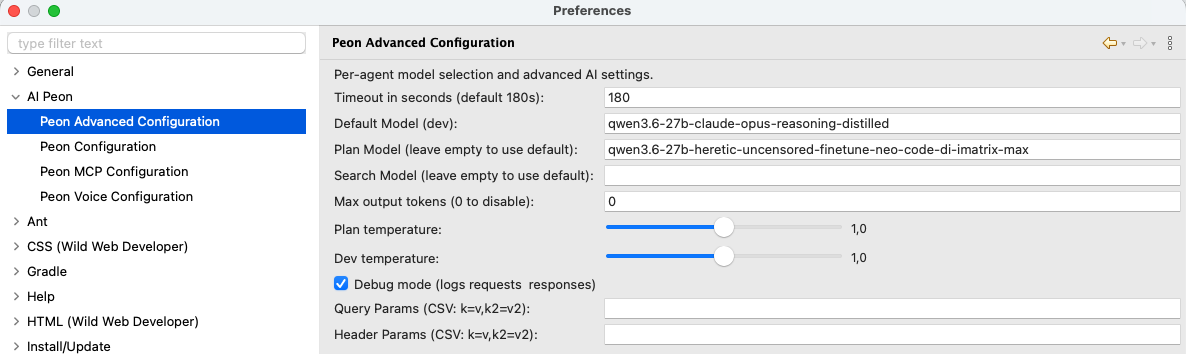
Per-Agent Model Selection
Different agents can use different models to optimize for cost, speed, or capability:
| Agent | Purpose | Recommended Model Type |
|---|---|---|
| Dev (default) | Implementing the plan / code generation | Reasoning-capable models (e.g., Sonnet) |
| Plan | Creating task plans and strategies | Reasoning-capable models (e.g., Opus) |
| Search | Finding relevant context and information | Fast, smaller models (e.g., Haiku) |
| Compact | Conversation compression for context management | Fast, smaller models (e.g., Haiku) |
How It Works
- The Dev agent always uses the base model you configure — this is your primary coding model
- Leave a per-agent field empty to use the provider's default for that agent
- Enter a specific model name to override only that agent's model
- Models are validated against your provider's available models when you click "Check Host and Port..."
Temperature Settings
Temperature controls the randomness of model outputs:
| Setting | Range | Effect |
|---|---|---|
| Plan Temperature | 0.6 - 1.0 | Higher = more creative plans; Lower = more deterministic |
| Dev Temperature | 0.4 - 1.0 | Controls code generation creativity (uses base model) |
- Claude and some other models only accept 1.0.
- Qwen 3.6 27B usually works best with 1.0 and 0.9
Per-Agent Think
Thinking/reasoning is sent per request, so each agent resolves its own value for its provider and model. This solves mixed setups — for example planning with GPT (reasoning.effort=high) while implementing with DeepSeek through an OpenAI-compatible gateway that rejects reasoning.effort.
Each agent — Dev (the default), Plan, and every custom agent — has three values. Search and Compact never think.
| Setting | Meaning |
|---|---|
| Model supports thinking | Supported → use the on-value; unsupported → use the off-value. The chat brain button saves this per selected agent. |
| Thinking value (on) | Used when thinking is supported. Empty → auto (the built-in model mapping picks the value for your provider/model). |
| Thinking value (off) | Used when thinking is unsupported. Empty → provider default, except Ollama sends think:false. |
The two value fields are an editable dropdown: pick a common preset or type any value your provider accepts.
| Provider | Reasoning value |
|---|---|
| OpenAI family | high / medium / low / minimal (reasoning.effort) |
| Claude (Anthropic) | enabled / adaptive (extended thinking) |
| Ollama | true / false (the think flag) |
| LM Studio | any value — sent as the custom reasoning body property |
Dev and Plan have their own support checkbox + on/off fields on this page; custom agents set the same via AGENT.md frontmatter. Nothing is inherited between agents.
Auto vs. manual
- Auto — both value fields empty → Peon uses the built-in mapping when thinking is supported.
- Manual — set either value field → the mapping is switched off in both directions and your strings are used verbatim.
Built-in model mapping
When both value fields are empty and thinking is supported, Peon maps to a provider- and model-specific value using built-in tables (one file per provider under the core plugin's thinking/ resources):
- OpenAI family — known reasoning models (
gpt*,o1,o3,o4) →reasoning.effort=high; an unknown model → nothing is sent. - Anthropic —
opus-4-8/opus-4-7/mythos→adaptive; other Claude models →enabled.
Provider support:
- OpenAI family (OpenAI, OpenAI-official / Azure, GitHub Models, GitHub Copilot) —
reasoning.effort. Empty/off = nothing sent. - Ollama — unsupported with an empty off-value sends
think:false; unset (null) omits. - Anthropic — extended thinking (
enabled/adaptive); off = nothing sent. - LM Studio — the custom
reasoningbody property. - Google Gemini / Mistral — no per-request support in the bundled langchain4j version; these follow the Dev/default support checkbox at build time.
Send thinking back
Show and resend model thinking (main Peon Configuration page) is a separate global transport switch. It is independent of model support.
Debug Mode
When enabled, logs all requests and responses to the Eclipse console.
Use cases:
- Troubleshooting connection issues
- Understanding what context is being sent to the model
- Debugging prompt template issues if you create an issue
Query Parameters
Add custom query parameters to API requests (format: key=value,key2=value2):
Example: stream=false,timeout=30
Useful for:
- Provider-specific options not exposed in the UI
- Testing different API behaviors
- Adding custom headers through query strings
Header Parameters
Add custom HTTP headers to requests (format: key=value,key2=value2):
Example: X-Custom-Header=myvalue,Authorization=Bearer token123
Useful for:
- Custom authentication requirements
- Provider-specific features via headers
- Adding tracking or debugging information
Max Output Tokens
Controls the maximum number of tokens in model responses (0 = disable limit): langchain4j and some LLMs default to 1024 -- if you have odd behaviors increase this.
| Setting | Effect |
|---|---|
| Low values (1024) | Short, concise responses; faster generation - may break |
| Recommended low (2048) | Have a short value, limits also the think budget where possible |
| Default nowerdays (4000) | Usually a a good default or with Opus around 8.000 |
| Disabled (0) | Provider's default limit applies - often around 2.048 |
Troubleshooting
Models Not Being Used by Agents
Restart Eclipse after changing preferences