
Peon AI — Interaction Design
Layout (top → bottom)
┌──────────────────────────────────────────────────────┐
│  1. Chat History (ChatMarkdownWidget)                │
│     fills all available vertical space               │
│                                                      │
├──────────────────────────────────────────────────────┤
│  2+3+4. Input Block (single SWT.BORDER, white bg)    │
│  ┌─────────────────────────────────────────────────┐ │
│  │ [📎 file.java ×] [📎 pom.xml ×]  (hidden)       │ │
│  ├─────────────────────────────────────────────────┤ │
│  │ Text (auto-grow, min 2, max 7 rows)       [🎤] │ │
│  │                                           [▶/■] │ │
│  ├─────────────────────────────────────────────────┤ │
│  │ [Plan▾] [Model▾] [🧠 Think] [Clear]      [▶/■] │ │
│  │ [Start Impl.] [☐ autonomous]  (conditional)     │ │
│  ├─────────────────────────────────────────────────┤ │
│  │ [📌 ProjectName] [⚡ N skills] [AGENTS.md]      │ │
│  │ [file.java] [MCP on/off] [Compact 45K/100K]     │ │
│  └─────────────────────────────────────────────────┘ │
└──────────────────────────────────────────────────────┘Section Details
2 — User Input (UserInputWidget)
- File chips bar: hidden until files are attached. Each chip: file icon + name +
×.+button opens workspace file picker. - StyledText: auto-grows, minimum 2 rows, maximum 7 rows (then scrolls).
Enter= newline,Ctrl/Cmd+Enter= send. Native OS background (white) — never set explicitly. - Right column: fixed-width column right of the StyledText, vertically filling the row.
verticalSpacing = 0so buttons sit flush with no separator gap.- Mic button
[🎤]at top: flat paint-basedButton(see swt-integrated-input-buttons.md). Turns red while recording viasetBackground(red)— the PaintListener picks it up. Created on first show, disposed on hide. Hidden unless voice is configured. - Send/Stop button
[▶/■]at bottom: always visible. Shows send icon when idle, stop icon while a request is in flight.
- Mic button
- Layout:
GridLayout(2)in the text row,horizontalSpacing = 0— StyledText fills, right column holds mic (top) and send/stop (bottom).
3 — Action Bar (ActionsBarWidget)
Sections 2, 3 and 4 share the same background color so they form one cohesive input block.
Layout: GridLayout(2) — left cell is a wrapping RowLayout composite, right cell is SendOrStopButton pinned SWT.RIGHT. horizontalSpacing = 0 between StyledText and adjacent buttons so seams aren't visible as gray lines.
| Position | Control | Notes |
|---|---|---|
| Left | Mode selector (Plan, Dev, Agent) | combo |
| Left | Model selector | combo, ~200px |
| Left | 🧠 Think toggle | on/off for extended thinking; default from "Supports Thinking" preference; session-only, not written back to preferences |
| Left | Clear | clears conversation history |
| Right (pinned) | Send / Stop | always rightmost; icon swaps while working |
| Conditional | Start Impl. | visible in Plan/Agent mode when AI has replied |
| Conditional | ☐ autonomous | checkbox, visible in Agent mode only |
4 — Status Bar (StatusLineWidget)
Wrapping RowLayout so controls reflow on narrow views. Shares background with sections 2 and 3.
| Control | Type | Notes |
|---|---|---|
| 📌 Project | Toggle button | pin/unpin project; shows project name; hidden if no project |
| Selected file | Label | currently active file in editor; automatically included in chat context |
| AGENTS.md | Label/icon | shown only when an AGENTS.md is found |
| ⚡ N skills | Toggle button | on/off; enables/disables skill loading; shows count |
| MCP on/off | Toggle button | enables/disables MCP tool servers |
| Compact N/M | Push button | color coding: yellow ≥ 70 %, red ≥ 88 % |
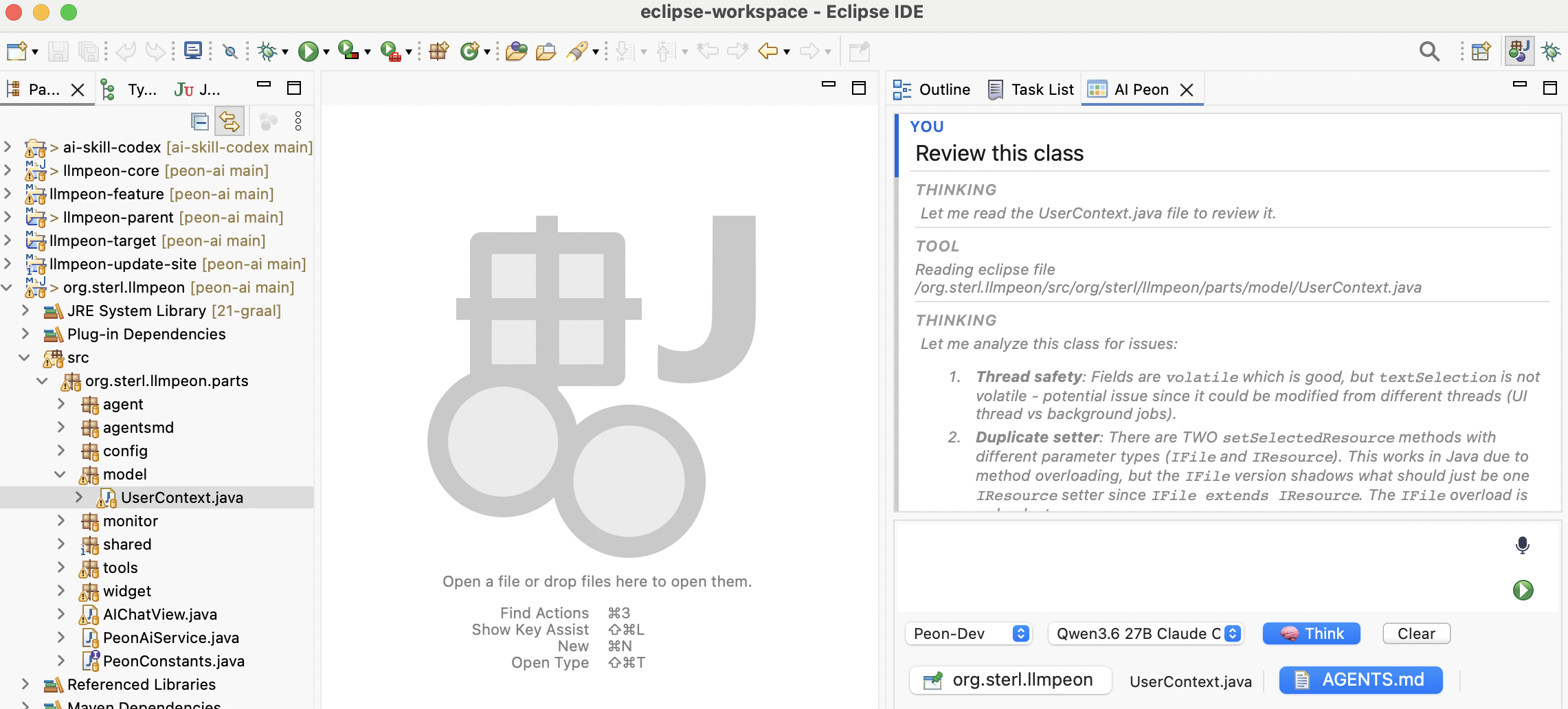
Visual Unification
Sections 2, 3 and 4 are children of a single inputBlock composite (SWT.BORDER). The single border on the outer wrapper is the only border in the input area — no internal borders between sections. Dividing lines between sections are optional thin separators at most.
Implementation rules (Phase 1, applies to section 2 today; sections 3–4 will follow in Phase 2):
- Never call
setBackground(...)orsetBackgroundMode(SWT.INHERIT_FORCE)on any composite that contains aStyledText. On macOS this overrides the native renderer and produces a gray field instead of white. Let the OS paint it. - Icon buttons are paint-based
Button(SWT.PUSH | SWT.NATIVE)widgets — seeSwtUtil.createIconButtonand swt-integrated-input-buttons.md. They inherit the parent's native background and have no visible OS frame. - Dynamic state (e.g. mic recording red) uses
button.setBackground(color)+redraw(); the PaintListener fills with the new color. Reset tonullto restore the inherited native background.