
MCP Configuration
MCP (Model Context Protocol) lets Peon AI connect to external tool servers — for example a documentation lookup server, a web search server, or any custom MCP-compatible service. The connected tools become available to the developer agent during implementation.
Setup
Open Window → Preferences → AI Peon → Peon MCP Configuration.
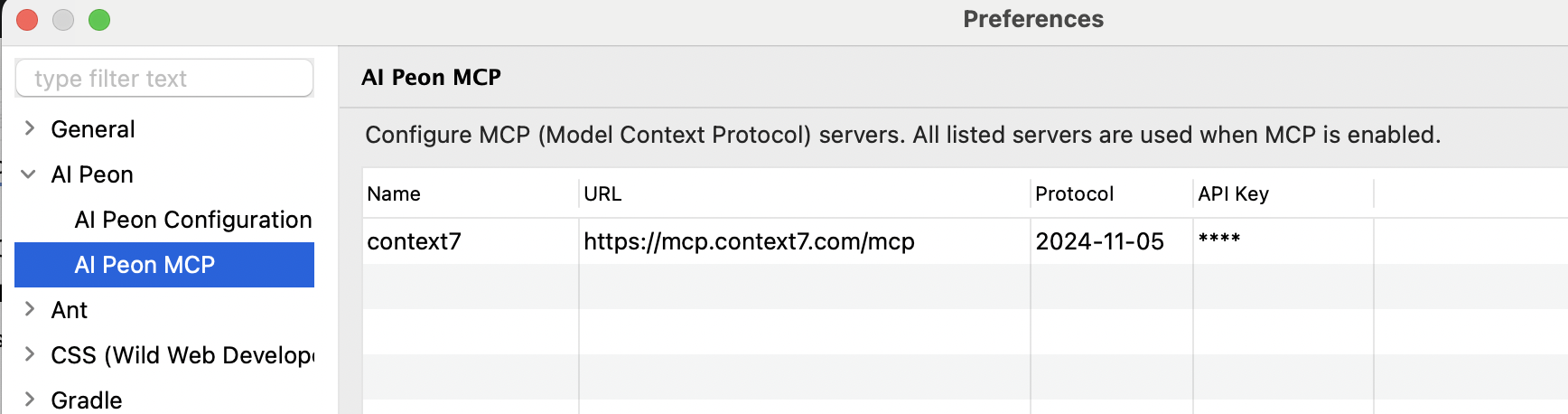
Each server entry has a Type — HTTP (Streamable), HTTP (legacy SSE), or STDIO (local process) — plus common fields shared by all types.
Common fields
| Field | Description |
|---|---|
| Name | Display name shown in the UI and used in log output. |
| Protocol Version | Dropdown with Auto, 2025-11-25, 2026-07-28, plus free text (e.g. 2024-11-05). Auto (empty) is the default and lets the client detect the version the server supports. 2025-11-25/2024-11-05 = Legacy, 2026-07-28 = modern. Any other value triggers version detection, which can fail with -32022 on dual-era servers. |
HTTP fields
Two HTTP transports are supported:
- HTTP (Streamable) — the current MCP transport. Single endpoint (typically
/mcp) that accepts JSON-RPC overPOSTand may upgrade to SSE for streaming responses. Use this for new servers. - HTTP (legacy SSE) — the older transport from the
2024-11-05spec. The client opens an SSE channel at/sseand posts messages back to a URL the server returns. Use this for servers that only expose/sse(e.g.docs-mcp-server).
If you get Unexpected status code: 405, you are most likely pointing the wrong transport at the server — switch between Streamable and legacy SSE.
| Field | Description |
|---|---|
| URL | Endpoint of the MCP server. For Streamable, e.g. https://mcp.context7.com/mcp. For legacy SSE, e.g. http://127.0.0.1:6280/sse. |
| API Key | Optional Bearer token. Leave empty if the server requires no authentication. |
STDIO (local process) fields
STDIO servers run as a local subprocess. Peon AI starts the process and communicates over its stdin/stdout. This is useful for MCP servers that need access to personal credentials or local system resources.
| Field | Description |
|---|---|
| Command | Executable to launch, e.g. uvx or npx. |
| Arguments | Space-separated arguments passed to the command, e.g. duckduckgo-mcp-server. |
| Environment Variables | Optional environment variables in KEY=VALUE format, one per line. Use this to pass tokens or configuration without exposing them in a URL. |
Example — DuckDuckGo web search via uvx:
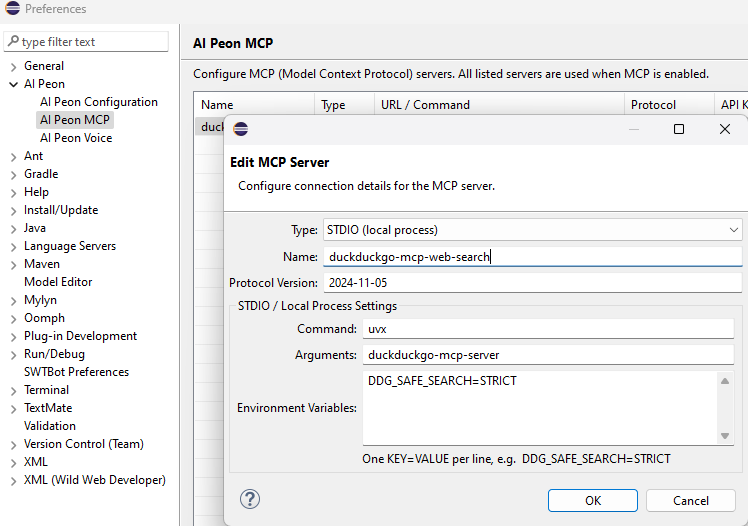
Type:      STDIO (local process)
Name:      duckduckgo-mcp
Command:   uvx
Arguments: duckduckgo-mcp-server
Env: DDG_SAFE_SEARCH=STRICTPrerequisite:
uvxrequires uv to be installed and available on the systemPATH.
Enabling MCP
Enable the MCP toggle in the chat toolbar to activate the configured servers. Peon AI connects to all servers on toggle-on and disconnects on toggle-off. If any server fails to connect, all servers are disconnected and an error is shown.
Changes apply live: saving the MCP preference page reconnects the servers with the new configuration immediately — no restart needed. If the configuration is unchanged, nothing is reconnected.
Notes
- MCP tools are exposed directly to the developer agent. The planner agent does not receive them directly — MCP tools carry no read/write flag, so the planner's read-only filter cannot be applied safely. The planner can still reach MCP tools indirectly via the search sub-agent, which does include them.
- The search sub-agent (used during planning and implementation) also has access to MCP tools, so read-only MCP servers (e.g. documentation lookup, web search) are useful there too.
- If any configured server fails to connect, all servers are disconnected and an error is shown — this prevents the agent from working with an incomplete tool set.
- Tool names are taken directly from the server. If two servers expose a tool with the same name, the last one registered wins.
Suggested MCP Servers
| Server | Type | Hosting | Best for |
|---|---|---|---|
| Context7 | HTTP | Cloud (free) | Up-to-date docs for React, Spring, Vite and many other frameworks. No setup required. |
| DuckDuckGo MCP | STDIO (uvx duckduckgo-mcp-server) | Local | Privacy-friendly web search without an API key. |
| docs-mcp-server | HTTP (Streamable or legacy SSE) | Self-hosted | Any documentation site you can crawl. Fully private — nothing leaves your machine. |
| openapi-mcp | HTTP | Self-hosted | REST APIs with an OpenAPI 3.x spec. Exposes each endpoint as a callable tool. |